 Inovent Agents · AI Robot Employees & AI Agents
Digital teammates that do the routine work — and ask before the rest.
Inovent Agents gives your workspace AI robot employees organised in teams, coordinated by a Master Orchestrator and governed by permissions, autonomy levels, budgets and human approval.
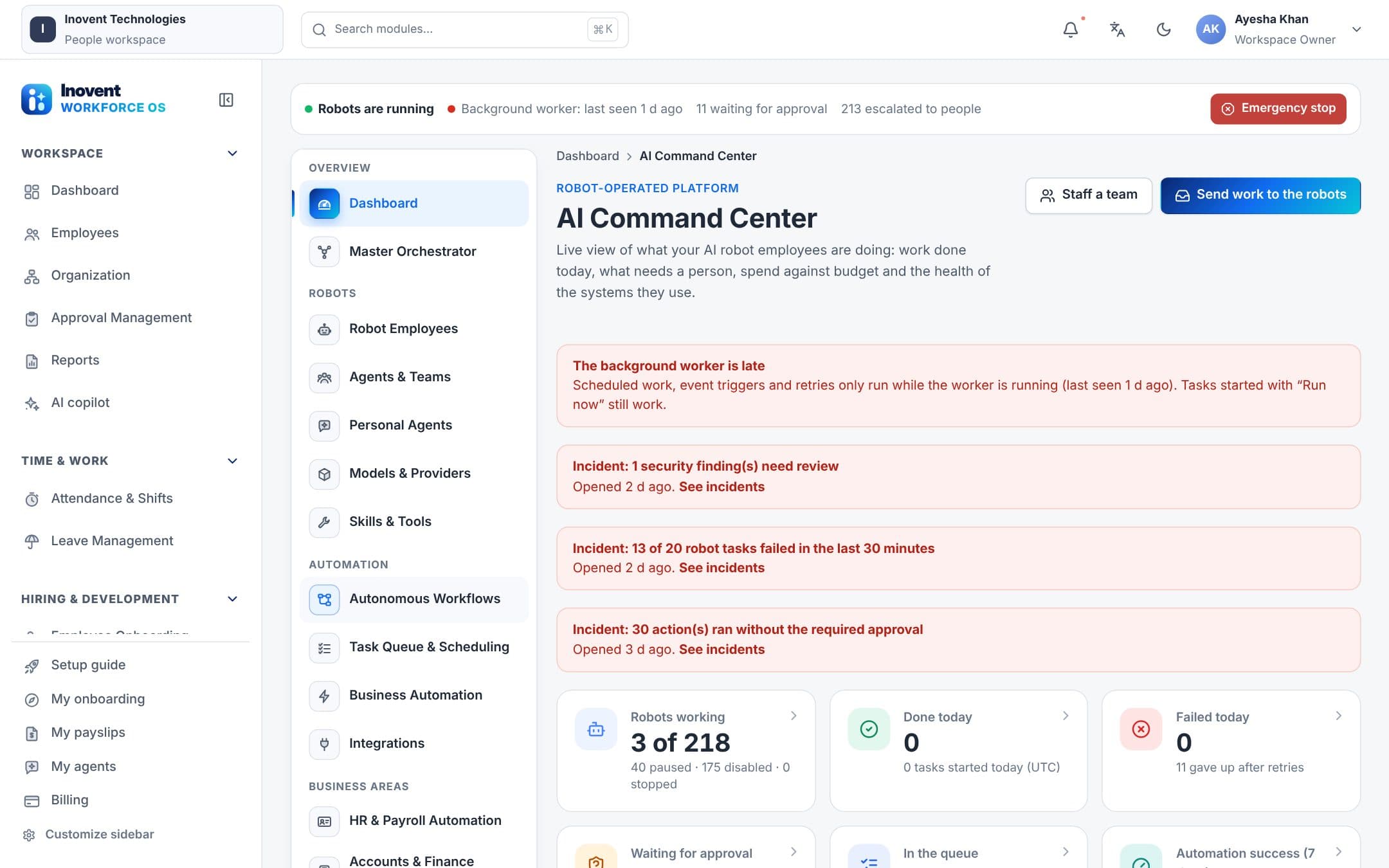
Digital teammates for a smarter workforce.
- Robot employees with their own ID, owner and budget
- Autonomy levels L1 to L5
- Deny-by-default permissions and field masking
- Human Approval Center for sensitive actions
What's included
Everything in Inovent Agents
Every item below is available in the product today.
Robot employees
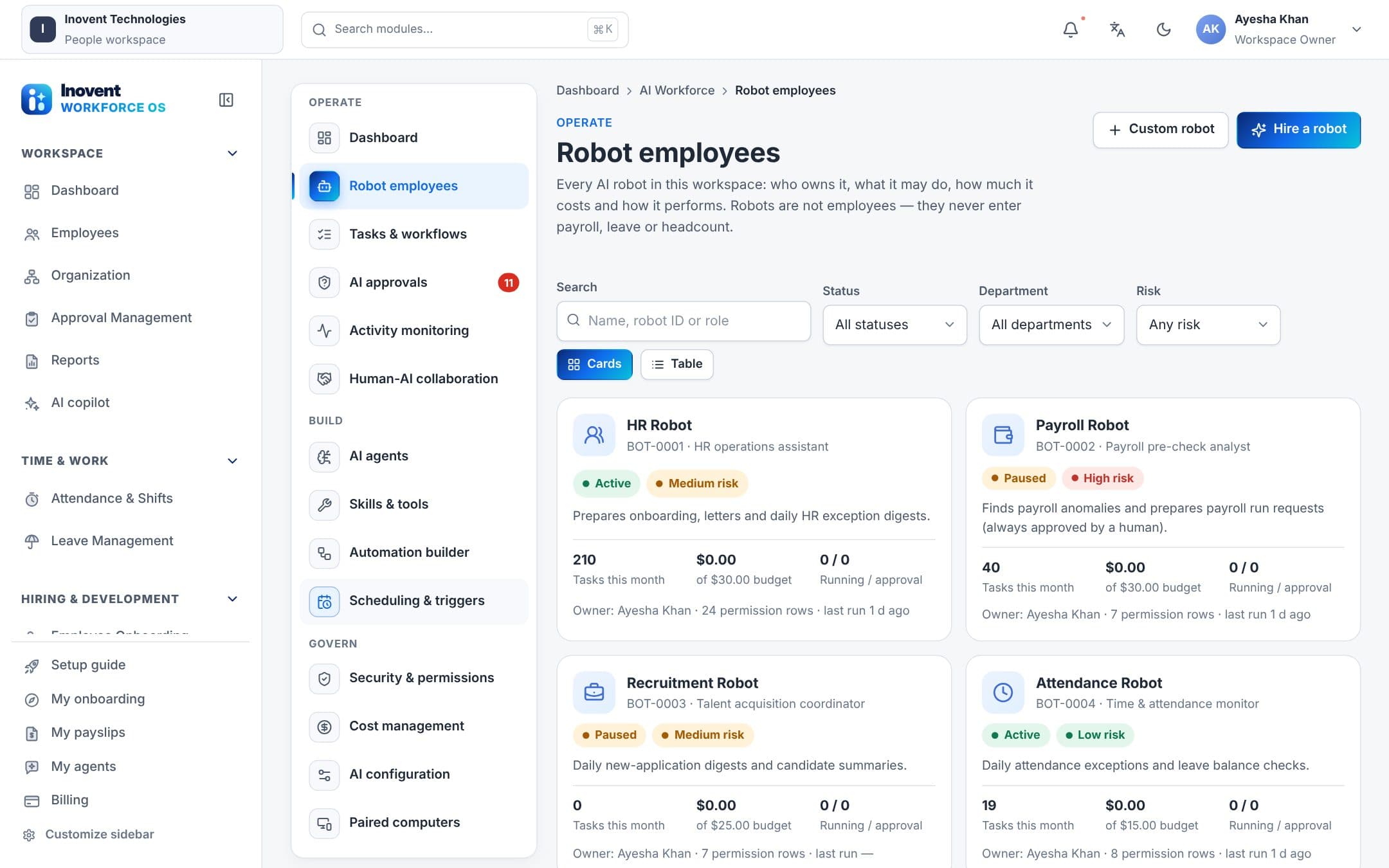
- Robot profilesEach robot has an ID (BOT-0001…), a human owner, team, role, schedule and time zone, budget, risk level and full execution history.
- Robot teamsHR, Payroll, Recruitment, Learning, Accounts & Finance, Reporting, Security, DevOps & Monitoring, Developer, QA and Compliance teams, staffed in one click.
- Job templatesReady-made robot jobs with suggested tools and schedules. New robots start paused, so nothing runs until you switch it on.
- Not employeesRobots never appear in payroll runs, headcount or employee reports. Their costs are tracked separately.
Coordination
- Master OrchestratorClassifies incoming work, assigns it to the right team, validates the output and escalates what needs a person.
- Structured hand-offsRobots pass work to each other with task IDs and input/output contracts; failures retry once, then escalate.
- Task queue & schedulingA durable queue with schedules, retries, a dead-letter list, worker health and stale-lock recovery.
- Memory & knowledgeTenant-isolated knowledge bases robots may cite, with access controls and versions.
Control
- Autonomy L1–L5Set per workspace, module, team, robot or task — from advisory only to coordinated work. Autonomy never adds permissions.
- Permissions & data scopeDeny by default. Tool, module and report rights with data scope; salary, bank, ID and personal fields are masked unless allowed.
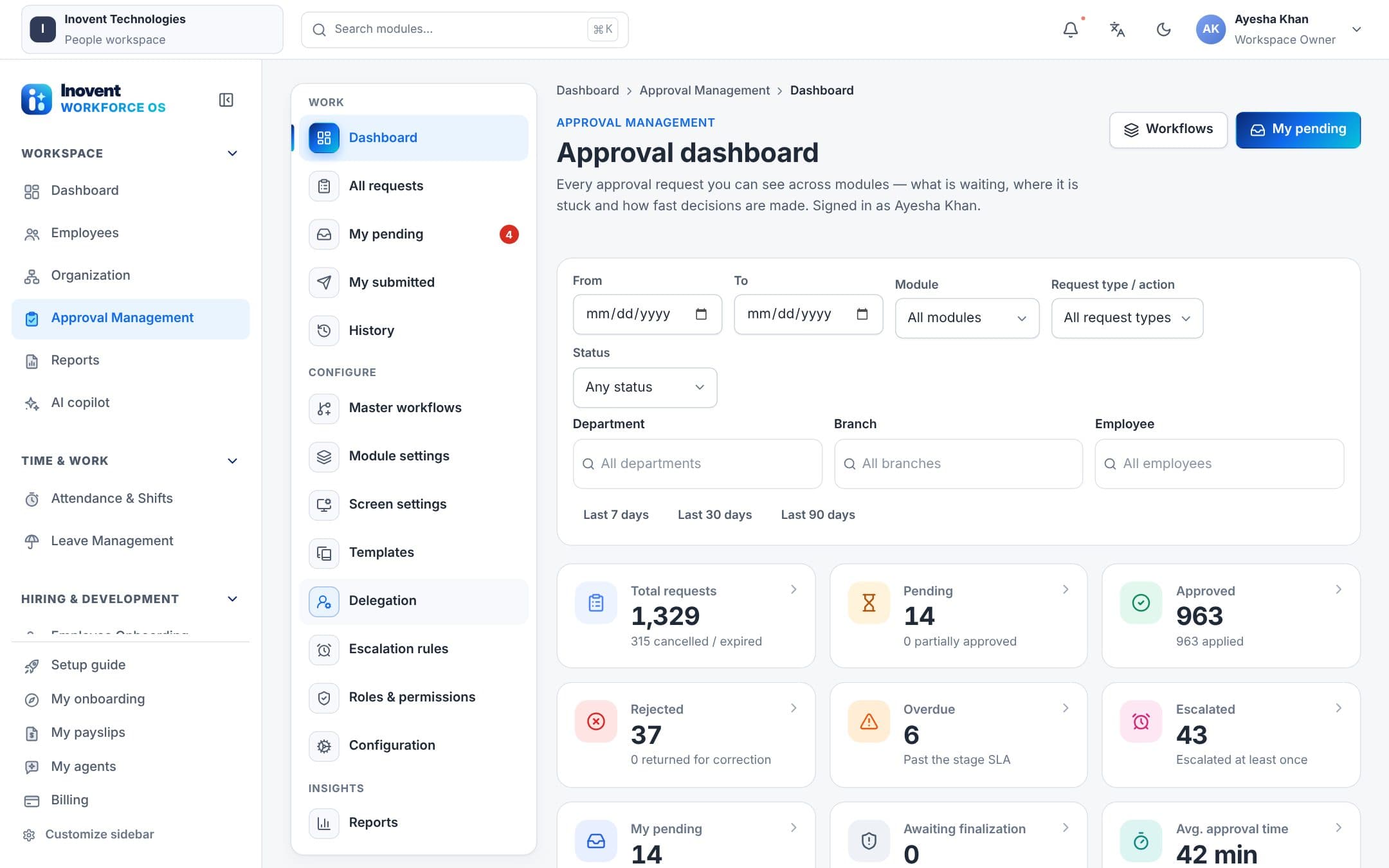
- Human Approval CenterEvery robot action that needs a decision waits here, with the proposed change and the reason.
- Costs, budgets & kill switchMonthly budgets per robot, hourly limits, spend by robot, team and model, and an emergency stop.
Where robots work
- AI Command CenterDashboard, robots, teams, models, tools, workflows, tasks, approvals, audit, configuration, costs and performance in one place.
- Desktop agentPaired Windows computers let robots read approved folders, save reports, print PDFs and — only if the person at the computer allows it — run commands.
- MobileSee robots, ask a robot for work and follow its task from your phone.
- Personal agentsEvery employee can create personal AI agents that act as them — leave, expenses, attendance, learning, reminders — and ask before changing anything.
Screens
See it in the product.
Use cases
Where teams use it every day.
Daily HR housekeeping
Morning checks for missing punches, leave anomalies and stalled onboarding, with drafts and reminders ready before the team logs in.
Payroll pre-checks
Robots validate inputs and prepare a draft run on the 25th; the payroll manager reviews exceptions and approves.
Weekly operations summary
The reporting robot builds a business summary every Monday and emails it to the people who need it.
Work on a team computer
A developer robot collects logs or runs an approved script on a paired computer, with every command logged.
How robots help
Robots prepare. People decide.
Every robot works through the same pipeline: permission check → autonomy level → approval if needed → execution → validation → audit.
- Master OrchestratorRoutes work to teams and keeps a daily operations summary.
- Reporting RobotGenerates reports from the report library and schedules their delivery.
- QA, Security & Compliance RobotsRun smoke checks, review the audit trail and build compliance evidence packs.
- DevOps & Developer RobotsWatch health and uptime, and do approved work on paired computers.
Robots can never approve their own work, change permissions or release payroll. High-risk tools ask a person at every level.
One platform
Works together with the rest of Inovent Workforce OS.

Inovent HCM
Human Capital Management
People. Performance. Possibilities.
Explore Inovent HCMInovent Agents
AI Robot Employees & AI Agents
Digital teammates for a smarter workforce.
Explore Inovent Agents
Inovent Learn
Learning & Training
Develop skills. Empower growth.
Explore Inovent Learn
Inovent Voice
AI Call Center
Every conversation powered by AI.
Explore Inovent Voice
Inovent Automate
Business Automation
Streamline work. Accelerate results.
Explore Inovent Automate
Inovent Intelligence
AI Analytics & Routing
Smarter decisions. Higher performance.
Explore Inovent Intelligence
Questions
Inovent Agents, answered.
What do autonomy levels change?
L1 only advises, L2 prepares drafts, L3 acts after a person approves each change, L4 does low-risk routine work on its own, and L5 also coordinates with other robots. Sensitive actions still need a person at L5.
Which AI models do robots use?
The models you connect: OpenAI, Anthropic, Google Gemini, Azure OpenAI, AWS Bedrock, Mistral, OpenRouter and other OpenAI-compatible endpoints — with routing and fallback.
Can a robot see salaries?
Not unless a permission row explicitly allows it, and only if the person who granted it holds that right too. Otherwise salary, bank, ID and personal fields are masked.
Put Inovent Agents to work.
Start a workspace today, or book a demo and we'll walk you through it with your own processes in mind.